
みなさんこんにちは!!!
Claude Codeは、Anthropicが提供するターミナルベースのコーディング用のAIエージェントです。
最近はClaude Codeでばっかり開発をしていますがXを監視していると「 **〇〇ですぐに破綻して使い物にならん〜** 」みたいな悲観的な話はよく見かけます。
実際、以下のような問題は頻発していると思います。
- **コードが多少大きくなった → コンテキストを見失い破綻**
- **コードが散らかっていく → 同上**
- **難易度が高いロジックを実装 → 嘘をつく**
過渡期なのでしゃーないですが、「どこまで実装を任せていいのか…!?」という不安はあるかなーと思います。
ただ、現段階でその辺りの話を見定めるためには、とにかく使ってみるしかないと思うので、今回は、実際に使い倒してみて、こうすると概ねうまくいくんじゃないかなーというTipsを集めてみました。
適切な設定と使い方で、これらの問題はある程度軽減できるかなと思います。
僕がいろいろ試しているのもありますし、「情報収集の末」うまくいった知見もたくさんあるため、「あれ?どっかで見たことあるなー」という設定などもあるかもしれません。
### ※20250725\_追記\_Claude Code設定集の公開
これらの設定を大体まるっと行うための設定集を作りました!!
`~/.claude` フォルダにうまいこと取り込んでもらうだけで、実プロジェクトにうまく適合させることができます!
### セットアップ手順
まぁこれは公式を見てください、という感じですが一応記載しておきます。
- 公式ドキュメント: [Claude Code概要](https://docs.anthropic.com/ja/docs/claude-code/overview)
```bash
npm install -g @anthropic-ai/claude-code
```
プロジェクトでの起動:
```bash
# プロジェクトディレクトリに移動
cd your-project-directory
# Claude Codeを起動
claude
```
Pro、Maxプランの場合はログインが求められるので、アカウント情報を入力するとログインして利用開始となります。
### ※20250831\_追記\_Claude Code v1.0.37へのダウングレード
以前、こんなつぶやきをしました。
[https://x.com/nokonoko\_1203/status/1949850204762710027](https://x.com/nokonoko_1203/status/1949850204762710027)
「Claude Code、アホになったよね」っていう話が一時期とても話題になり、なんなら今でも継続中です。
最新版だと利用するのが苦痛になるような挙動を見せるので、Claude Codeのバージョンを1.0.24に固定するのがおすすめです、という趣旨のポストなんですが、v1.0.24だと
- Winで利用できない
- モデルを変えるたびにsettings.jsonがリセットされるバグ
といった制約があります。
つい最近、npmでのインストールではなくネイティブインストールできる方法が公式から公開されていたんですが、以下のようにv1.0.24をインストールしようとすると、用意されていませんでした…
```text
curl -fsSL https://claude.ai/install.sh | bash -s 1.0.24
```
どうやら、v1.0.37以前のバージョンは存在しないようです。
ただ、v1.0.37を利用してみると、体感としてはv1.0.24と変わらない挙動をすることが確認できたので、以下のコマンドでインストールすることをお勧めします!
```text
curl -fsSL https://claude.ai/install.sh | bash -s 1.0.37
```
## 実践的な使い方
### よく使うコマンド一覧
claude code自体に色々なオプションがあります。
特に、前回の会話を再開する `-c` オプションなんかは頻繁に利用するかもしれません。
詳しくはクイックスタートへ。
```bash
# Claude Codeの起動
claude
# 特定のディレクトリで起動
claude /path/to/project
# 最新版への更新
claude update
# 前回の会話を継続
claude -c
# 会話履歴を参照して起動
claude -r
# バージョン確認
claude --version
```
### コマンドで効率化
`claude` コマンドを実行すると、Claude Codeが起動し、プロンプトを入力できるようになりますが、先頭に `/` をつけると、Claude Codeの便利ツールが使えます。
```bash
# モデルの切り替え(Sonnet/Opus)
> /model
# コンテキストに別フォルダを追加
> /add-dir <path>
# 会話履歴をクリア
> /clear
```
コマンドはたくさんあって、claudeを起動させた状態で `/` を入力するだけでサジェストされますが、 `/help` コマンドにはより詳しい情報が載っています。
```text
Claude Code v1.0.33
Always review Claude's responses, especially when running code. Claude has read access to files in the current directory and can run commands and edit
files with your permission.
Usage Modes:
• REPL: claude (interactive session)
• Non-interactive: claude -p "question"
Run claude -h for all command line options
Common Tasks:
• Ask questions about your codebase > How does foo.py work?
• Edit files > Update bar.ts to...
• Fix errors > cargo build
• Run commands > /help
• Run bash commands > !ls
Interactive Mode Commands:
/add-dir - Add a new working directory
/bug - Submit feedback about Claude Code
/clear - Clear conversation history and free up context
/compact - Clear conversation history but keep a summary in context. Optional: /compact [instructions for summarization]
/config - Open config panel
/cost - Show the total cost and duration of the current session
/doctor - Checks the health of your Claude Code installation
/exit - Exit the REPL
/help - Show help and available commands
/ide - Manage IDE integrations and show status
/init - Initialize a new CLAUDE.md file with codebase documentation
/install-github-app - Set up Claude GitHub Actions for a repository
/login - Sign in with your Anthropic account
/logout - Sign out from your Anthropic account
/marp - Simplify markdown and convert to PDF with Marp (user)
/mcp - Manage MCP servers
/memory - Edit Claude memory files
/migrate-installer - Migrate from global npm installation to local installation
/model - Set the AI model for Claude Code
/permissions - Manage allow & deny tool permission rules
/pr-comments - Get comments from a GitHub pull request
/README - Claude Commands (user)
/release-notes - View release notes
/resume - Resume a conversation
/review - Review a pull request
/status - Show Claude Code status including version, model, account, API connectivity, and tool statuses
/terminal-setup - Install Shift+Enter key binding for newlines
/upgrade - Upgrade to Max for higher rate limits and more Opus
/vim - Toggle between Vim and Normal editing modes
Learn more at: https://docs.anthropic.com/s/claude-code
```
### 頻繁なアップデート(※非推奨)
Claude Codeはめちゃくちゃ高頻度でアップデートされ、新機能追加やバグ修正が行われています。定期的なアップデートで最新機能を活用できます。
```bash
# アップデート
claude update
# バージョン確認
claude --version
```
### ※20250831\_追記\_Claude Code v1.0.37へのダウングレード
前項で記載したとおり、 **性能が劣化するため、バージョンアップ非推奨です!!**
### 設計・タスク整理・実装を明確に分離
複雑なタスクでは、フェーズを明確に分けることで品質を向上させることができそうだなーと思っています。
問題をとにかく小さくして、それをうまく積み上げて行くのはエンジニアとして腕の見せ所かもしれません。
例えば僕は以下のテンプレートを使用し、それぞれの項目(「作業の目的・背景」など)を **自分で埋めた** 上で、指示を出します。
(ただし、「\*具体的な指示をしない」方が性能が上がる!なども言われています。)
もしかすると、 **後述のカスタムコマンドを作成** したり、 **CLAUDE.mdなどでグローバルルールとして設定** する方が良いのかもしれません。この辺りは目的や呼び出したいタイミングに応じて決めましょう。
```md
実装作業に必要な設計を行なって、方針を示してください。
タスクは非常に細かく分割し、一度の指示でエラーなく実装できるような粒度でにしてください。
設計方針と作業のステップを示してください。
## 作業の目的・背景
## 作業内容
## 詳細仕様
## 前提条件
## 考慮すべきポイント
## 成果物が満たす条件
## その他、細々とした注意点
```
### CLAUDE.mdによるグローバル設定
`~/.claude/CLAUDE.md` ファイルで、プロジェクト横断的なルールを設定できます。
例えば僕の設定例では以下のようなことを実現しています。
- 英語で思考、日本語で応答
- ドキュメントは英語、実装コメントは日本語
- 並列処理の最大化
- タスク完了時の通知
- 設計ドキュメントの自動生成(`.tmp/design.md` 、`.tmp/task.md` )
モデル自身が英語圏で生まれている上、世の中の情報が圧倒的に多いため、英語で思考させると精度が高いとかなんとか…
ただ、僕は英語が得意ではないため、レスポンス自体は日本語でさせています。
具体的には、以下のような設定をしています。
```md
# Guidelines
This document defines the project's rules, objectives, and progress management methods. Please proceed with the project according to the following content.
## Top-Level Rules
- To maximize efficiency, **if you need to execute multiple independent processes, invoke those tools concurrently, not sequentially**.
- **You must think exclusively in English**. However, you are required to **respond in Japanese**.
## Project Rules
- Follow the rules below for writing code comments and documentation:
- **Documentation** such as JSDoc and Docstrings must be written in **English**.
- **Comments embedded within the code**, such as descriptions for Vitest or zod-openapi, must be written in **English**.
- **Code comments** that describe the background or reasoning behind the implementation should be written in **Japanese**.
- **Do not use emojis**.
- When writing Japanese, do not include unnecessary spaces.
- for example
- ◯ "Claude Code入門"
- × "Claude Code 入門"
- To understand how to use a library, **always use the Contex7 MCP** to retrieve the latest information.
- When searching for hidden folders like \`.tmp\`, the \`List\` tool is unlikely to find them. **Use the \`Bash\` tool to find hidden folders**.
- **You must send a notification upon task completion.**
- "Task completion" refers to the state immediately after you have finished responding to the user and are awaiting their next input.
- **A notification is required even for minor tasks** like format correction, refactoring, or documentation updates.
- Use the following format and \`osascript\` to send notifications:
- \`osascript -e 'display notification "${TASK_DESCRIPTION} is complete" with title "${REPOSITORY_NAME}"'\`
- \`${TASK_DESCRIPTION}\` should be a summary of the task, and \`${REPOSITORY_NAME}\` should be the repository name.
## Project Objectives
### Development Style
- **Requirements and design for each task must be documented in \`.tmp/design.md\`**.
- **Detailed sub-tasks for each main task must be defined in \`.tmp/task.md\`**.
- **You must update \`.tmp/task.md\` as you make progress on your work.**
1. First, create a plan and document the requirements in \`.tmp/design.md\`.
2. Based on the requirements, identify all necessary tasks and list them in a Markdown file at \`.tmp/task.md\`.
3. Once the plan is established, create a new branch and begin your work.
- Branch names should start with \`feature/\` followed by a brief summary of the task.
4. Break down tasks into small, manageable units that can be completed within a single commit.
5. Create a checklist for each task to manage its progress.
6. Always apply a code formatter to maintain readability.
7. Do not commit your changes. Instead, ask for confirmation.
8. When instructed to create a Pull Request (PR), use the following format:
- **Title**: A brief summary of the task.
- **Key Changes**: Describe the changes, points of caution, etc.
- **Testing**: Specify which tests passed, which tests were added, and clearly state how to run the tests.
- **Related Tasks**: Provide links or numbers for related tasks.
- **Other**: Include any other special notes or relevant information.
```
**※2025/07/02追記**
**カスタムコマンド** や **Hooks** が便利になってきたので、あまりCLAUDE.mdに情報を詰め込まない方が良いかもしれません。(長文になればなるほど、コンテキストを見失い機能しなくなる)
現在はこのくらいシンプルになりました。
目的に合わせて調整していきましょう!
```md
# Guidelines
This document defines the project's rules, objectives, and progress management methods. Please proceed with the project according to the following content.
## Top-Level Rules
- To maximize efficiency, **if you need to execute multiple independent processes, invoke those tools concurrently, not sequentially**.
- **You must think exclusively in English**. However, you are required to **respond in Japanese**.
- To understand how to use a library, **always use the Contex7 MCP** to retrieve the latest information.
## Programming Rules
- Avoid hard-coding values unless absolutely necessary.
- Do not use \`any\` or \`unknown\` types in TypeScript.
- You must not use a TypeScript \`class\` unless it is absolutely necessary (e.g., extending the \`Error\` class for custom error handling that requires \`instanceof\` checks).
```
`Programming Rules` なんかは、コードレビューを行なってくれるMCPなどがあればそちらに任せてしまうこともできると思います。
### MCPによる機能拡張
MCP(Model Context Protocol)を活用して、Claude Codeの機能を大幅に拡張できます。
MCPを利用する上で楽で簡単な方法は、 `claude mcp add` コマンドを使用することです。
```bash
# Context7をグローバル設定に追加
claude mcp add -s user context7 -- npx -y @upstash/context7-mcp@latest
# プロジェクト共有設定として追加
claude mcp add -s project context7 -- npx -y @upstash/context7-mcp@latest
```
より高度な設定が必要な場合は、設定ファイルを直接編集することも可能です。
設定ファイル( `~/.claude/.mcp.json` )の例
```json
{
"mcpServers": {
"github": {
"command": "docker",
"args": [
"run",
"-i",
"--rm",
"-e",
"GITHUB_PERSONAL_ACCESS_TOKEN",
"ghcr.io/github/github-mcp-server"
],
"env": {
"GITHUB_PERSONAL_ACCESS_TOKEN": "..."
}
},
"context7": {
"type": "stdio",
"command": "npx",
"args": ["-y", "@upstash/context7-mcp@latest"]
},
"playwright": {
"command": "npx",
"args": ["-y", "@playwright/mcp@latest"]
}
}
}
```
各MCPサーバーの用途
- **GitHub MCP**: GitHubリポジトリの操作(Issue、PR、コードの取得)
- **Context7**: ライブラリのドキュメントをリアルタイムで取得
- **Playwright**: ブラウザ自動化とWebスクレイピング
グローバルな設定は本来 `~/.claude.json` に記載するのが適切かと思いますが、 `claude` コマンドでMCP用の設定ファイルを指定することも可能で、そちらを利用しています。
また、公式ドキュメントのとおり `claude mcp add` コマンドで追加することができます。
```bash
claude mcp add <name> <command> [args...]
```
### ※20250831\_追記\_Serenaの利用
Claude Codeの性能が劣化したね、と言われたあたりから急速に利用が広まっているのが「Serena」というツール(MCPサーバー)です。
LSP(Language Server Protocol)を使ってシンボルベースでコードの解析を行い、LLMによるコード検索および作成・修正をとても効率良く、精度良く、トークン消費を抑えてくれることから、現在では必須のツールになっています。
こちらの記事がとても参考になりました。
利用方法はとても簡単で、開発するプロジェクトのディレクトリに移動し、以下のコマンドを実行するだけです。
```text
claude mcp add serena -- uvx --from git+https://github.com/oraios/serena serena-mcp-server --context ide-assistant --project $(pwd) && \
uvx --from git+https://github.com/oraios/serena serena project index
```
このコマンドにより、MCPサーバーの追加やSerenaの初期化などを行なってくれます。
実行後は普通にClaude Codeを起動させ
```text
serenaを利用してコードを検索し、〇〇を修正してください
```
のように指示すれば動いてくれます。
ただ、以下のようにカスタムスラッシュコマンドを仕込んでおくとなお良いかもしれません。
(こちらのコードはどなたかの記事を参考にさせていただいたものですが、元記事を完全に忘れてしまい…見つかり次第リンクを貼ります…!!)
### 効果的なコードレビュー
claude codeの `/review` コマンドを利用して、コードレビューを行うことができますが、フォーマットを指定したい場合は普通にプロンプトでレビューを実施させることもできます。
```md
\`https://github.com/{owner}/{repository}/pull/{pull request ID}\`のようにpull requestのURLを指定するので、レビューを依頼された場合には、pull requestを取得し、コードレビューを日本語で詳細かつ丁寧に行なってください。
技術的なテクニックに特に着目し、より良い手法を提案してください。
- 処理の責務分離
- 処理の共通化
- 不要なコードの削除
- APIレスポンスの最適化
- テストの品質向上
- 変数名の整合性
- エラーハンドリングの改善
- 処理場所の適切性(バックエンド/フロントエンド)
フォーマット:
---
# PR番号とタイトル
## 変更概要
## 変更ファイル
## コード変更の詳細分析
## レビューコメント
### 良い点
### 改善点・確認点
## 結論
---
ではレビューを行ってください。
pull requestのURL:
```
### 思考拡張による精度向上
Claude Codeには、複雑な問題に対してより深い分析を行うための「拡張思考モード」があります。
特定のキーワードを使用することで、異なるレベルの計算リソースを割り当てることができます。
キーワードは複数存在するようですが、全て `think` から始まるワードの方が覚えるのが楽だったため、このように思せています。
- `think` - 基本レベル(4,000トークン)
- 使用例:簡単なリファクタリングや説明
- `think hard` / `think deeply` - 詳細レベル(10,000トークン)
- 使用例:アーキテクチャの設計、複雑なバグの解析
- `think harder` / `ultrathink` - 最大レベル(31,999トークン)
- 使用例:大規模リファクタリング、システム全体の最適化提案
使用例:
```text
> "think hard このコードのパフォーマンスを改善する方法を考えて"
> "think super hard このアーキテクチャの問題点と改善案を提示して"
```
ただし、思考拡張はトークン消費が増えるため、レートリミットに注意が必要です。
### セキュリティを考慮したpermissions設定
`~/.claude/settings.json` で、ファイルアクセスやコマンド実行の権限を細かく制御できます。
プロジェクト(どころかPC諸共)破壊するような危険なコマンドは禁止しつつ、効率よく開発ができるようにバランスを取る必要がありそうです。
こちらの記事なんかを参考にさせていただきました。
```json
{
"env": {},
"permissions": {
"allow": [
"Read(**)",
"Write(src/**)",
"Write(docs/**)",
"Write(.tmp/**)",
"Bash(git init:*)",
"Bash(git add:*)",
"Bash(git commit:*)",
"Bash(git push origin*:*)",
"Bash(git status:*)",
"Bash(git diff:*)",
"Bash(git log:*)",
"Bash(npm install:*)",
"Bash(pnpm install:*)",
"Bash(rm *)",
"Bash(ls:*)",
"Bash(cat **)",
"Bash(osascript -e:*)",
"mcp__context7__resolve-library-id",
"mcp__context7__get-library-docs"
],
"deny": [
"Bash(sudo:*)",
"Bash(rm -rf:*)",
"Bash(git push:*)",
"Bash(git reset:*)",
"Bash(git rebase:*)",
"Read(.env.*)",
"Read(id_rsa)",
"Read(id_ed25519)",
"Write(.env*)",
"Bash(curl:*)",
"Bash(wget:*)"
]
},
"model": "opus",
"preferredNotifChannel": "auto",
"enableAllProjectMcpServers": false
}
```
### Git Worktreeとccmanagerの活用
Git Worktreeを使用することで、同一リポジトリの複数ブランチを異なるディレクトリで同時に作業できます。
Claude Codeでの利点
- 複数タスクの並列実行が可能
- ブランチ切り替えによるコンテキストロスを防止
- 各worktreeで独立したセッションを維持
worktreeを効率的に管理する手法として、 `ccmanager` などのツールの利用が挙げられます。
ccmanagerは、複数のClaude Codeセッションを効率的に管理するCUIツールです。
```bash
# インストール
npm install -g ccmanager
```
設定により以下が実現可能
- 各worktreeのステータス表示(作業中、入力待ち、完了など)
- ショートカットによる素早いセッション切り替え
- Git操作のUI統合
- カスタムコマンドによる自動化
ただし、マルチタスクは疲労度が高いため、適度な利用を推奨します。
並列開発をしていると色々なリポジトリのルートで頻繁に `ccmanager` コマンドを叩く必要があるので、shellの設定( `~/.zshrc` など)には以下のように設定しておくとコマンドが短縮できて地味に便利でしょう。
```text
alias ccm='ccmanager'
```
ccmanagerには以下のような設定を使用しています。
commandを設定することでclaude codeに実行させる引数を指定できます。
実際に利用してみると以下のようになります。
簡単にworktreeの作成、削除などが行えます。
**※2025/07/02追記**
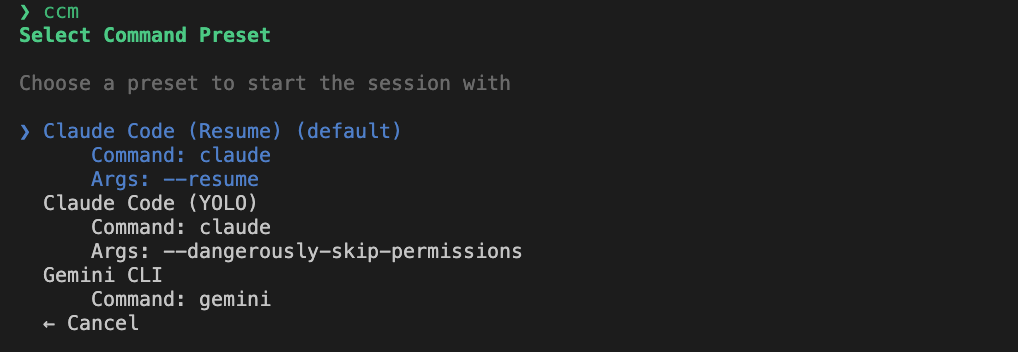
ccmanagerで「 **プリセット** 」の設定ができるようになっていました!
設定しておくとワークツリーを選択した後に、設定したプリセットでClaude Codeを起動させられます!
例えば `~/.config/ccmanager/config.json` の設定ファイルを以下のように設定しているとしましょう。
```json
{
"worktree": {
"autoDirectory": true,
"autoDirectoryPattern": "../{branch}"
},
"commandPresets": {
"presets": [
{
"id": "claude-resume",
"name": "Claude Code (Resume)",
"command": "claude",
"args": ["--resume"],
"fallbackArgs": []
},
{
"id": "claude-yolo",
"name": "Claude Code (YOLO)",
"command": "claude",
"args": [
"--dangerously-skip-permissions"
],
"fallbackArgs": []
},
{
"id": "gemini-default",
"name": "Gemini CLI",
"command": "gemini",
"args": [],
"detectionStrategy": "gemini"
}
],
"defaultPresetId": "claude-resume",
"selectPresetOnStart": true
}
}
```
こうすると、以下のようにどのコマンドを実行するか選択できるようになります!
[](https://qiita-user-contents.imgix.net/https%3A%2F%2Fqiita-image-store.s3.ap-northeast-1.amazonaws.com%2F0%2F203944%2F5ce57e20-8802-4e5a-8291-7f6424db1a5c.png?ixlib=rb-4.0.0&auto=format&gif-q=60&q=75&s=396040c0d5622456c8887e22dd975e6c)
**`Gemini CLI` を実行す** ることもできちゃうのでめちゃ便利です!!
### 作業完了通知の自動化
`~/.claude/CLAUDE.md` に、作業完了後には以下のようなコマンドを実行するように指示しておくことで、作業完了時に自動通知を受け取れます:
```bash
osascript -e 'display notification "${TASK_DESCRIPTION} is complete" with title "${REPOSITORY_NAME}"'
```
この設定により:
- 長時間実行タスクの完了を見逃さない
- 並列作業時の進捗管理が容易
- 作業効率が向上
**※2025/07/02追記**
後述するHooksが利用可能になったため、そちらで通知した方が確実かもしれません!
### カスタムスラッシュコマンドの作成
カスタムコマンドで作業を効率化できます。
例えば、以下のようなコマンドで発表スライド作成コストの短縮などができるかもしれません。
**※2025/07/02追記**
`@` プレフィックスを利用して、コマンド実行の前に指定されたファイルを含めることができるようになりました!
コマンドを微修正しました!
例:Marpでマークダウンからスライドを自動生成
`~/.claude/commands/marp.md` :
```md
---
allowed-tools: Read, Write, Bash(marp:*, rm:*)
description: Simplify markdown and convert to PDF with Marp
---
## Context
- Input file: $ARGUMENTS
- Guidelines: @~/.claude/templates/slide-guidelines.md
- Template: @~/.claude/templates/design-template.md
## Your task
1. Read the input markdown file
2. Read the slide guidelines
3. Simplify the markdown content according to the guidelines
4. Read the design template
5. Apply the template to the simplified content
6. Save to a temporary file
7. Convert to PDF using Marp CLI
8. Clean up the temporary file
```
このコマンドでは事前に用意した以下のようなテンプレートを利用しています。
- `~/.claude/templates/design-template.md`
```md
---
marp: true
theme: white-minimal
paginate: true
---
<style>
</style>
```
- `~/.claude/templates/slide-guidelines.md`
```md
# Slide Simplification Guidelines
## Core Principles
### 1. One Slide, One Message
- Each slide should convey a single, clear message
- Avoid information overload
- Supplement details verbally or in separate materials
### 2. Title Rules (\`##\`)
- **Maximum 30 full-width characters** (or ~60 half-width characters)
- **Must fit on one line** - wrapping breaks the layout
- Keep titles concise and clear
### 3. Content Guidelines
#### Text and Bullet Points
- **Characters per line:** 35-45 full-width characters
- **Bullet points per slide:** 5-7 items maximum
- **Lines per bullet point:** 1-2 lines ideally
- **Paragraph lines:** 5-7 lines maximum
#### Subtitle Rules (\`###\`)
- Maximum 15 full-width characters
- Use for section breaks or sub-headings only
#### Tables
- **Columns:** 3-4 maximum
- Keep cell content concise
- Consider bullet points for complex data
## Simplification Strategies
### 1. Remove Redundancy
- Eliminate repetitive phrases
- Remove obvious statements
- Cut unnecessary transitional words
### 2. Use Clear Structure
- Start with the most important point
- Use parallel construction in lists
- Group related items together
### 3. Simplify Language
- Replace complex terms with simple ones
- Use active voice
- Avoid jargon unless necessary
### 4. Visual Hierarchy
- Use headings to structure content
- Break long paragraphs into bullet points
- Add whitespace for readability
## Examples
### Bad Example
---
## An Extremely Long Title About Very Important Technical Debt in This Project and Its Detailed Repayment Plan with Comprehensive Considerations
---
### Good Example
---
## Technical Debt Repayment Plan
---
### Before Simplification
---
- In order to properly understand the complex nature of our system architecture, it is absolutely essential that we first take into consideration the various interconnected components and their relationships
---
### After Simplification
---
- Understand system architecture through component relationships
---
```
使用方法はこれだけです。
```text
/marp path-to-markdown
```
### Gemini CLIを利用したGoogle Web Search
Gemini CLIはClaude Codeの類似ツールです。
コーディングタスクを行う上ではClaude Codeの方が性能が良いという話は聞こえてきますが、Web検索による情報収集ならGemini CLIの圧勝だそうです。
前項で説明したカスタムコマンドとして `search` を登録しましょう。
**※2025/07/02追記**
`!`プレフィックスを利用して、コマンド実行の前にbashコマンドを実行できるようになりました!また、 `think` などのキーワードを入れておくことで、思考拡張を行えるようになっています。
コマンドを微修正しました!
- `~/.claude/commands/search.md`
```md
---
allowed-tools: Bash(gemini:*)
description: "Use the Gemini CLI to perform web searches."
---
## Gemini Search
**Run the Gemini CLI with the Bash tool instead of the Web_Search tool**
You will receive a command like \`>/search [arguments]\`.
Use the Bash tool to launch Google_Web_Search in the Gemini CLI and search for the arguments you received as follows:
- Use !\`gemini -p 'google_web_search:[arguments]'\`
Please narrow down the keywords you want to search for about 2-3.
think.
```
このように利用することができます。
```text
> /search "気圧とその変化を示す時系列データって、どんなデータがある?"
⏺ 気圧とその変化を示す時系列データの種類
主なデータ形式
1. GRIB/GRIB2形式 - 世界気象機関(WMO)標準の気象データ形式
2. NetCDF形式 - 科学データの保存・共有に広く使用
3. JSON形式 - Web APIで提供される形式
4. CSV/テキスト形式 - シンプルな時系列データ
利用可能なデータソース
1. NOAA GFS (Global Forecast System)
- 全球予報データ(0.25度解像度)
- 地表面気圧、海面更正気圧など
- GRIB2形式で提供
2. Open-Meteo API
- 無料の気象予報API
- JSON形式で簡単にアクセス可能
- 過去データと予報データを提供
3. 気象庁データ
- アメダス観測データ
- 高層気象観測データ
データ内容
- 地表面気圧 (surface pressure)
- 海面更正気圧 (mean sea level pressure)
- 気圧の時間変化率
- 予報時系列データ (3時間ごと、最大16日先まで)
```
### Hooksを利用したタスク完了通知
**※2025/07/02追記**
Hooksを利用するとClaude Codeのライフサイクル(各工程が完了した時)でコマンドが実行できるようになります!
今まではカスタムコマンドやCLAUDE.mdに記述をしても、LLMが実行判断を下さなかったり、コンテキストを見失ってしまうと記述した処理を実行してくれませんでしたが、Hooksでは特定のアクションが必ず実行されるようになります!
Hooksを利用するにはまず `~/.claude/settings.json` にhooksセクションを追加する必要があります。
こちらの記事も参考にさせてもらいました。
```json
{
"env": {
...
},
"permissions": {
...
},
"hooks": {
"Stop": [
{
"matcher": "",
"hooks": [
{
"type": "command",
"command": "~/.claude/hooks/stop-send-notification.js"
}
]
}
],
"PostToolUse": [
{
"matcher": "Write|Edit|MultiEdit",
"hooks": [
{
"type": "command",
"command": "~/.claude/hooks/textlint-hook.js"
}
]
}
]
}
}
```
実行されるcommandをワンライナーで記述しても良いですが、複雑なものを作成するときには `~/.claude/hooks` フォルダを作成し、実行可能なプログラム(シェルスクリプトや.jsや.pyなど)を配置し、そのパスを指定しましょう。
`Stop` や `PostToolUse` はフックイベントを指定し、 `matcher` にはClaude Codeがどのようなタイミングでコマンドを実行するかを指定します。
フック時には標準入力でJSONを受信します。
このため、実行したいプログラムでは標準入力から値を抽出し、何かしら処理する必要があります。
今回作った `textlint-hook.js` は、ファイル編集ツール終了時に実行され、 `textlint` というツールを実行し、日本語文章を整えます。
プログラムが実行されたのち、対象がマークダウンの場合はさらに別のコマンドが実行されるような作りです。
(以下、適当にLLMに作らせたプログラムなので、実行は自己責任でお願いします。)
```js
#!/usr/bin/env node
const fs = require('fs');
const path = require('path');
const { spawn } = require('child_process');
const os = require('os');
/**
* Check if file is a markdown file
*/
function isMarkdownFile(filepath) {
return filepath.endsWith('.md') || filepath.endsWith('.markdown');
}
/**
* Run textlint on the file and return result
*/
function runTextlint(filepath) {
return new Promise((resolve) => {
try {
const configPath = path.join(os.homedir(), '.claude', '.textlintrc.json');
// First, check for errors
const textlint = spawn('npx', ['textlint', '-c', configPath, filepath], {
stdio: ['inherit', 'pipe', 'pipe']
});
let stdout = '';
let stderr = '';
textlint.stdout.on('data', (data) => {
stdout += data.toString();
});
textlint.stderr.on('data', (data) => {
stderr += data.toString();
});
textlint.on('close', (code) => {
if (code !== 0) {
// Errors found, try to fix them
console.error(\`Textlint found issues in ${filepath}. Attempting to fix...\`);
// Run with --fix option
const fixTextlint = spawn('npx', ['textlint', '-c', configPath, '--fix', filepath], {
stdio: ['inherit', 'pipe', 'pipe']
});
let fixStdout = '';
let fixStderr = '';
fixTextlint.stdout.on('data', (data) => {
fixStdout += data.toString();
});
fixTextlint.stderr.on('data', (data) => {
fixStderr += data.toString();
});
fixTextlint.on('close', (fixCode) => {
if (fixCode === 0) {
console.error(\`✅ Textlint automatically fixed issues in ${filepath}\`);
} else {
console.error(\`⚠️ Some textlint issues could not be automatically fixed in ${filepath}\`);
console.error(fixStdout);
}
resolve(fixCode);
});
} else {
resolve(0);
}
});
} catch (error) {
console.error(\`Error running textlint: ${error}\`);
resolve(1);
}
});
}
// Read input from stdin
let inputData = '';
process.stdin.setEncoding('utf8');
process.stdin.on('data', (chunk) => {
inputData += chunk;
});
process.stdin.on('end', async () => {
try {
const input = JSON.parse(inputData);
// Get tool information
const toolName = input.tool_name || '';
const toolInput = input.tool_input || {};
// Check if this is a file editing tool
if (!['Edit', 'Write', 'MultiEdit'].includes(toolName)) {
process.exit(0);
}
// Get the file path
let filePath = toolInput.file_path || '';
// For MultiEdit, also check edits
if (toolName === 'MultiEdit') {
// MultiEdit can edit multiple files, but file_path is the target
if (!isMarkdownFile(filePath)) {
process.exit(0);
}
} else {
// For Edit and Write, check the file path
if (!filePath || !isMarkdownFile(filePath)) {
process.exit(0);
}
}
// Expand the file path
filePath = filePath.replace(/^~/, os.homedir());
// Check if file exists (it should after editing)
if (!fs.existsSync(filePath)) {
console.error(\`Warning: File ${filePath} does not exist\`);
process.exit(0);
}
// Run textlint
await runTextlint(filePath);
// Exit with 0 even if textlint found issues (non-blocking)
process.exit(0);
} catch (error) {
console.error(\`Error: Invalid JSON input: ${error}\`);
process.exit(1);
}
});
```
textlintについては別記事を書く予定です!
## まとめ
ということでいくつかTipsを紹介してきました!
Claude Codeはそもそも何もしなくても便利ですが、ちょっとした変更でもっと便利になります。
以下まとめです。
- 頻繁なアップデート
- 設計・タスク整理・実装を明確に分離
- CLAUDE.mdによるグローバル設定
- MCPによる機能拡張
- 効果的なコードレビュー
- 思考拡張による精度向上
- セキュリティを考慮したpermissions設定
- Git Worktreeとccmanagerの活用
- 作業完了通知の自動化
- カスタムスラッシュコマンドの作成
- Gemini CLIを利用したGoogle Web Search
**※2025/07/02追記**
- Hooksを利用したタスク完了通知
皆さんもやっていきましょう!
[1](https://qiita.com/nokonoko_1203/items/#comments)
コメント一覧へ移動
X(Twitter)でシェアする
Facebookでシェアする
はてなブックマークに追加する
新規登録して、もっと便利にQiitaを使ってみよう
1. あなたにマッチした記事をお届けします
2. 便利な情報をあとで効率的に読み返せます
3. ダークテーマを利用できます
[ログインすると使える機能について](https://help.qiita.com/ja/articles/qiita-login-user)
[新規登録](https://qiita.com/signup?callback_action=login_or_signup&redirect_to=%2Fnokonoko_1203%2Fitems%2F67f8692a0a3ca7e621f3&realm=qiita) [ログイン](https://qiita.com/login?callback_action=login_or_signup&redirect_to=%2Fnokonoko_1203%2Fitems%2F67f8692a0a3ca7e621f3&realm=qiita)
[422](https://qiita.com/nokonoko_1203/items/67f8692a0a3ca7e621f3/likers)
いいねしたユーザー一覧へ移動
291